






















Black Friday
15% off Open Core HR and eligible add-ons

Use code BLACKFRIDAY15
Through Nov 30, 11:59 p.m. IST

Shop the offer

Skip to content
CZ App Studio

Attendance checks

v2.0.0 November 16, 2026 Web & mobile

Geofence Attendance

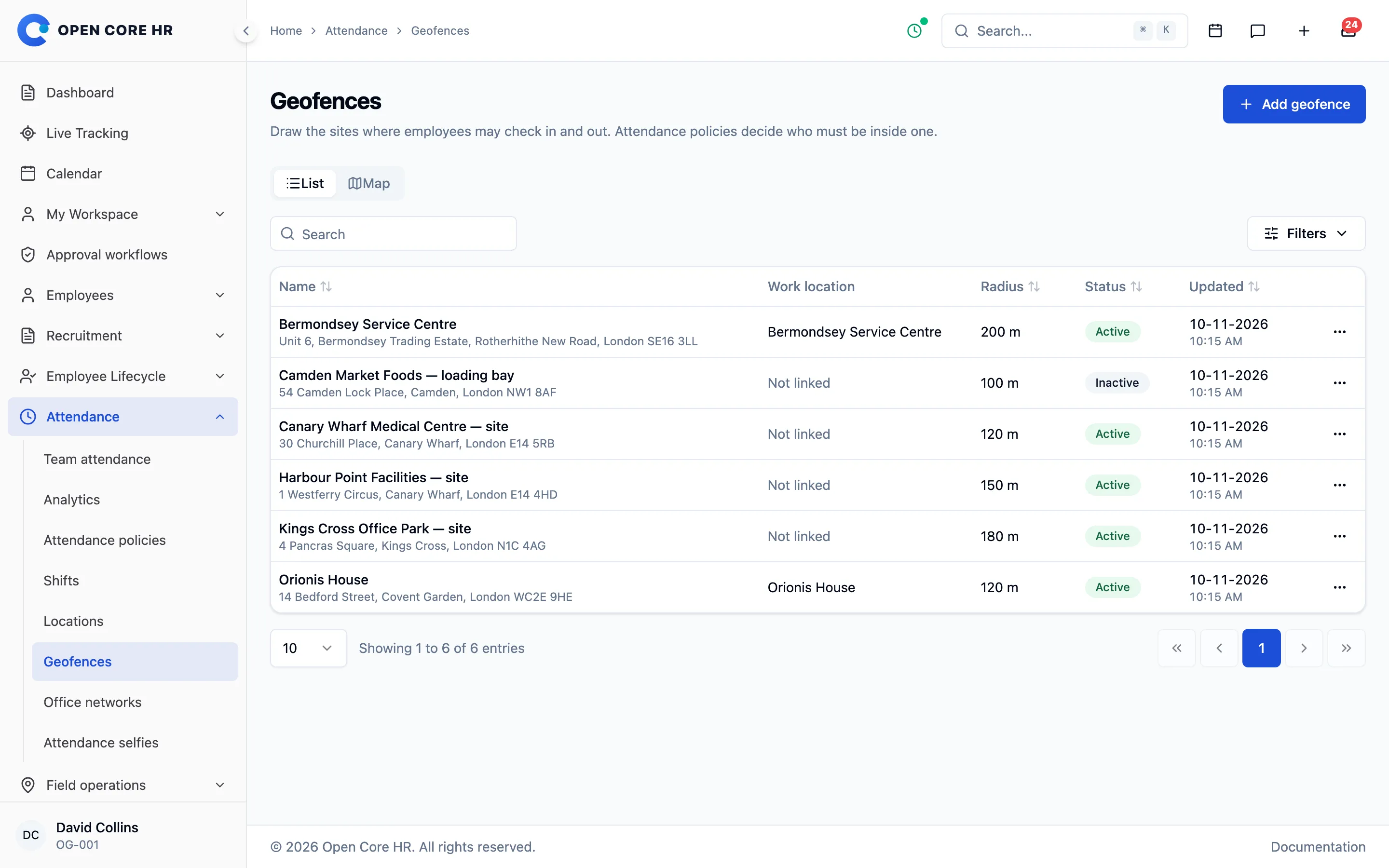
Accept check-in and check-out only inside the sites you draw on a map, such as offices, warehouses or customer locations. Attendance policies decide who must be on site.

  • Map-drawn sites
  • radius per site
  • work-location geofences
  • GPS accuracy and age limits
  • mock-location refusal
Software details Documentation

71 sold

Best seller

Your software license

$49.00

One-time purchase

What’s included

  • Permanent licence for one production installation
  • 12 months of released updates
  • 6 months of support from CZ App Studio
  • Full source code

What support covers · What it does not cover

Licenses

Works with

Geofence Attendance runs inside Open Core HR. Tick anything you do not have yet to add it to this order.

Already a customer? Sign in to see what you own. Customer sign in

Prices are in USD. Pay in USD by PayPal or card, or in INR by UPI, card or net banking in India. Your final total is shown before payment.

Optional, after the first year
Updates$19.00 / 12 months
Standard support$19.00 per 6 months

Standard vs premium support

See Geofence Attendance in Open Core HR

Limit check-in to areas you draw on a map or to your office networks, and refuse positions faked by location-spoofing apps.

More about Time and attendance
Geofences drawn on a map for attendance

What you can do

  • Circular sites placed by address search, map click, current location or coordinates, with a 20–10,000 m radius.
  • Geofences linked to work locations, so each employee is checked against their own sites.
  • Policy rules for any chosen sites or the employee’s work-location sites.
  • Maximum GPS uncertainty and location age; simulated locations are always refused.
  • Refused attempts show the distance outside the nearest site in attendance review.
  • Combines with IP Attendance and Selfie Attendance in the same attendance policy.

Where and how it works

Sites are managed on the web and checked when employees record attendance in the Open Core HR mobile app. Place search uses your maps key; without it the map and pin still work.

Software details

Version 2.0.0 · PHP 8.5+ · MySQL 8.4 · Node.js 26 LTS
Latest version
v2.0.0
Last updated
5 days ago
Minimum requirement
Open Core HR Core 2.0.0 or later
Server stack
PHP 8.5+ · MySQL 8.4 · Node.js 26 LTSFull server requirements
Software type
Add-on module for Open Core HR
Platforms
Web & mobile
Languages
All 25 languages included, right-to-left readyEnglish Arabic Spanish French Hindi Portuguese (Brazil) Indonesian Chinese (Simplified) Bengali Urdu German Russian Japanese Korean Turkish Vietnamese Thai Filipino Swahili Tamil Telugu Marathi Persian Malay Italian
License
Permanent license · 12 months of updates
Delivery
ZIP download from your account67.2 KB download
Support
6 months included, extendable to 12 months
Release history
v2.0.0 · November 16, 2026First release of Geofence attendance for Open Core HR 2.0. Install it from the Modules page after activating Core.
DocumentationSetup, configuration and day-to-day use of Geofence Attendance.
Explore other add-ons

Standard and premium support

6 months of standard support come with your licence. Open to compare it with premium support.

Standard support

Included with your licence

We answer your questions and fix problems in the product.

  • Questions about how a feature works
  • Help understanding the installation and update guides
  • Fixing bugs in the product
  • Advice on security issues and the release that fixes them

How you get it

6 months come with every licence. Extend to 12 months when you buy, or renew later from your account.

Renew for $19.00 per 6 months

Premium support

Paid by the hour

Our team works on your installation for you.

  • Installing or updating the software on your server
  • Changing how the product works for your business
  • Server, email, domain and SSL setup
  • Importing or moving your data
  • Live calls, screen sharing and training

How you get it

Buy a support-hour package. We tell you how long the work will take before we start, and only the time used comes off your balance. Hours never expire.

From $34.95 per hour

Which one do I need?

  • “A report shows the wrong total.” Standard support
  • “Where do I set up shifts?” Standard support
  • “Please update my server to the latest version.” Premium support
  • “Add a new field to the leave form.” Premium support
  • “Import our employees from a spreadsheet.” Premium support
  • “Train our team on a call.” Premium support

Support questions

Does my software stop working when support ends?

No. Your licence is permanent and the software keeps working. You only lose the ability to open standard support tickets until you renew.

What can I do when my 6 months of support end?

Renew standard support from your account for another 6 months, at any time. Or buy support hours when you only need help with one task. Nothing renews automatically.

I still have standard support. Do I need premium support too?

Only when you want our team to do work that standard support does not cover, such as installing, customising, importing data or training. Many customers never need it.

Will I be charged for premium support without agreeing first?

No. We send an estimate of the time needed, and nothing is taken from your support hours until you approve it. Every use is listed in your account.

Do support hours expire?

No. Unused hours stay on your account until you use them.

Is support the same as updates?

No. Updates give you new releases for 12 months. Support gives you help from our team. They are renewed separately, and neither one stops your software.

Can your team install the product for me?

Yes. Choose a fixed-price installation plan, or use support hours. Setting it up yourself with an AI assistant and our guides is free.

How do I ask for help?

Sign in, open Support in your account and create a ticket. You choose standard or premium there, and we tell you if a request needs the other one.

Geofence Attendance

From first step to finished work

  1. Draw each site on the map and link it to a work location if you like.

  2. Add an “Inside a geofence” check to an attendance policy.

  3. Employees check in from the mobile app; positions outside the sites are refused with a clear reason.

Questions about this add-on

Does it track employees all day?

No. It checks the position reported at check-in and check-out against your sites. Continuous field tracking is a separate Core feature.

What happens when my updates expire?

Your installed software continues to run and eligible earlier releases remain available. Renew when you want another year of updates; there is no automatic renewal.

Geofence Attendance

Ratings & reviews

Geofence Attendance $49.00

Put HR and field work in one place, starting today.

We set up your own private copy of Open Core HR and keep it running. Try it with your real team for 7 days, no card needed.

Inside Open Core HR

Swipe across to explore the screen.

Inside Open Core HR