People and HR records
Employee records, organisation, dashboards and self-service
 Open Core HRby CZ App Studio
Run HR and field operations from one platform. Manage employee records, attendance, leave, expenses and approvals, and give field teams customers, visit plans and live GPS tracking in the same app. Self-hosted, with source code.
$199.00
Each license covers one deployed installation for your business or one client.

A closer look
Explore the areas your HR team, field managers and employees use every day. Select a workspace to see what it covers.
Included in Core
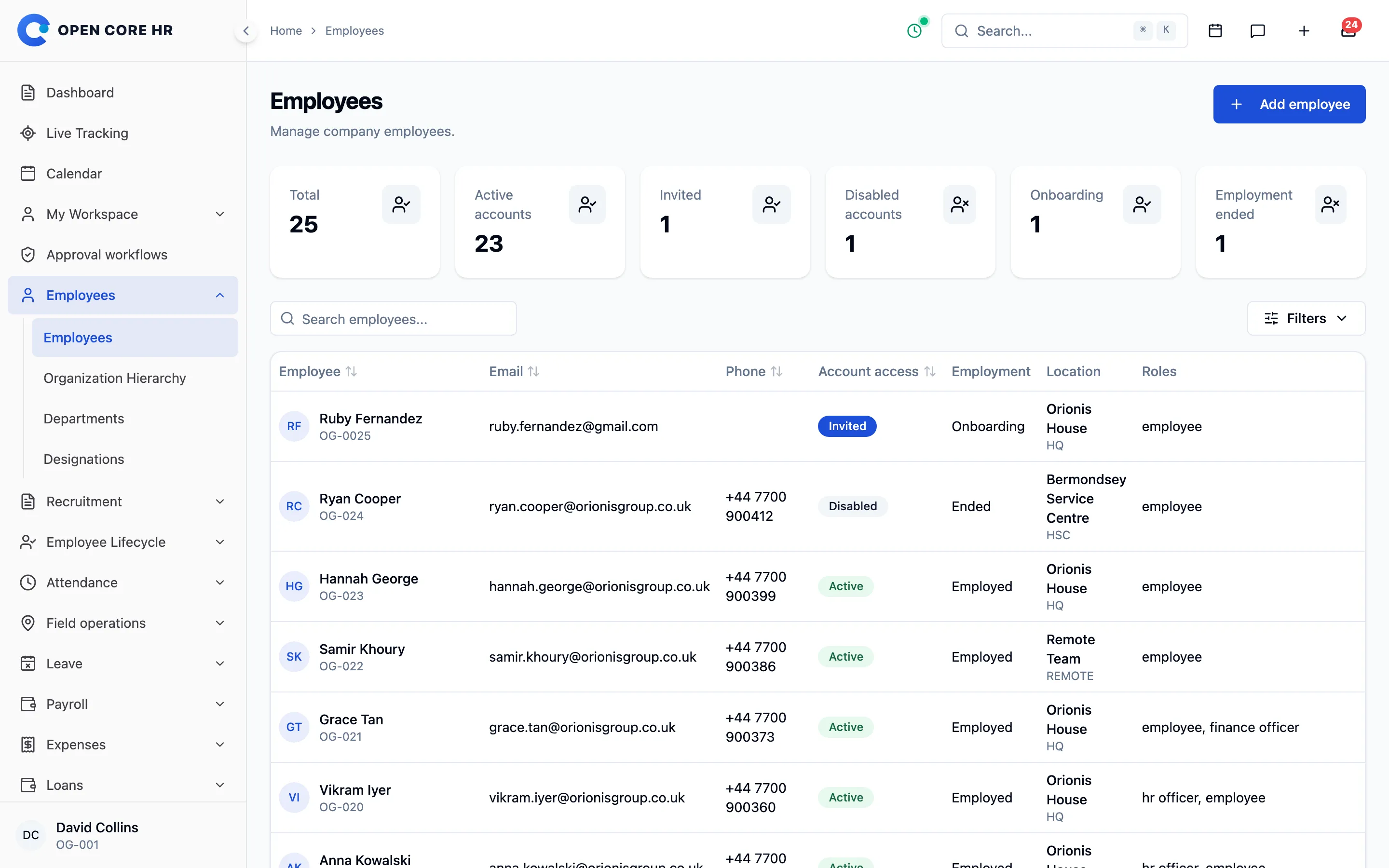
Keep personal, work, compensation and bank details together, with employment history and an audit trail.
Included in Core
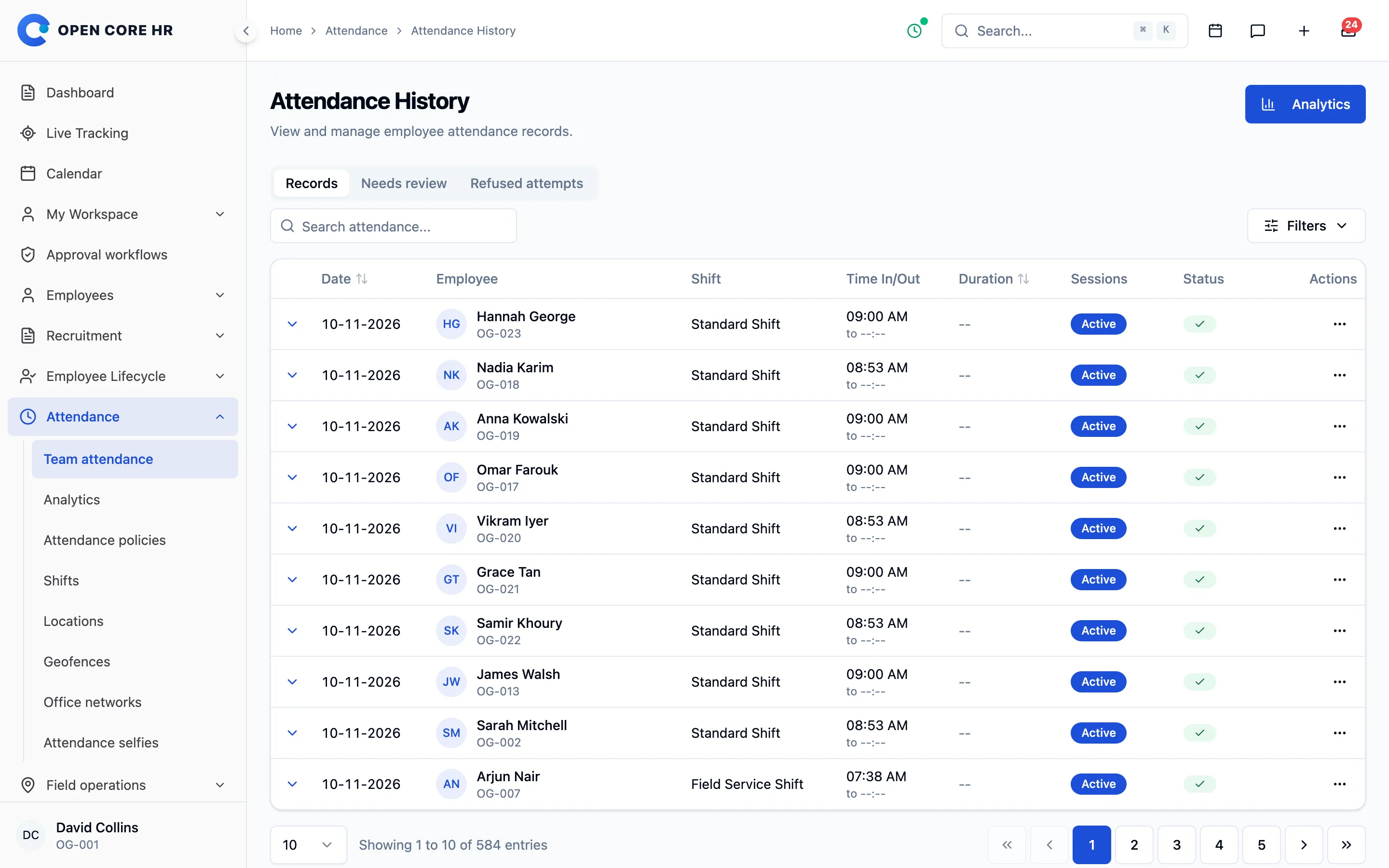
Employees check in from the app. Policies, shifts and approved locations decide what counts.
Included in Core
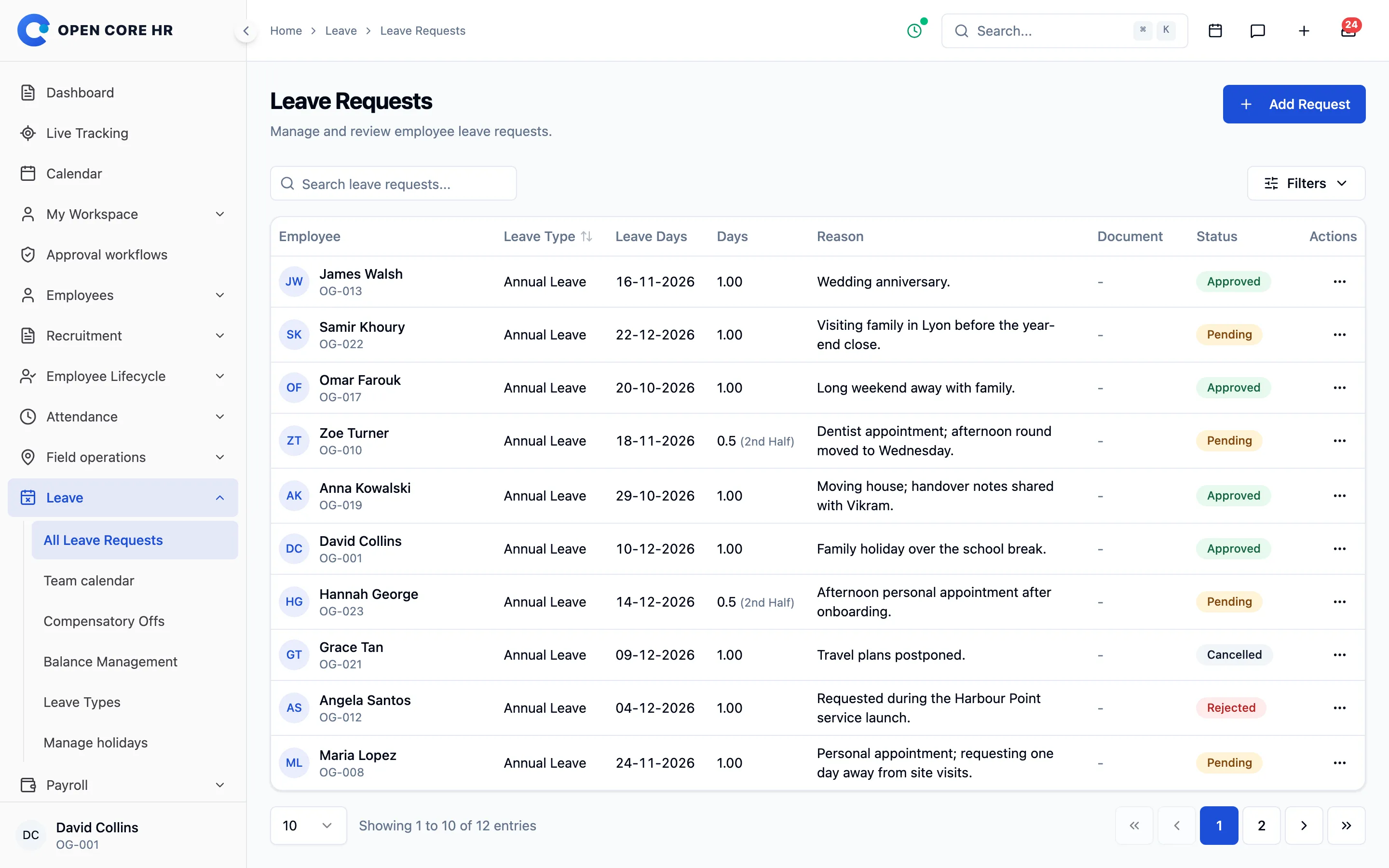
Configure leave types and balances, let employees request from their phone and keep the team calendar current.
Included in Core
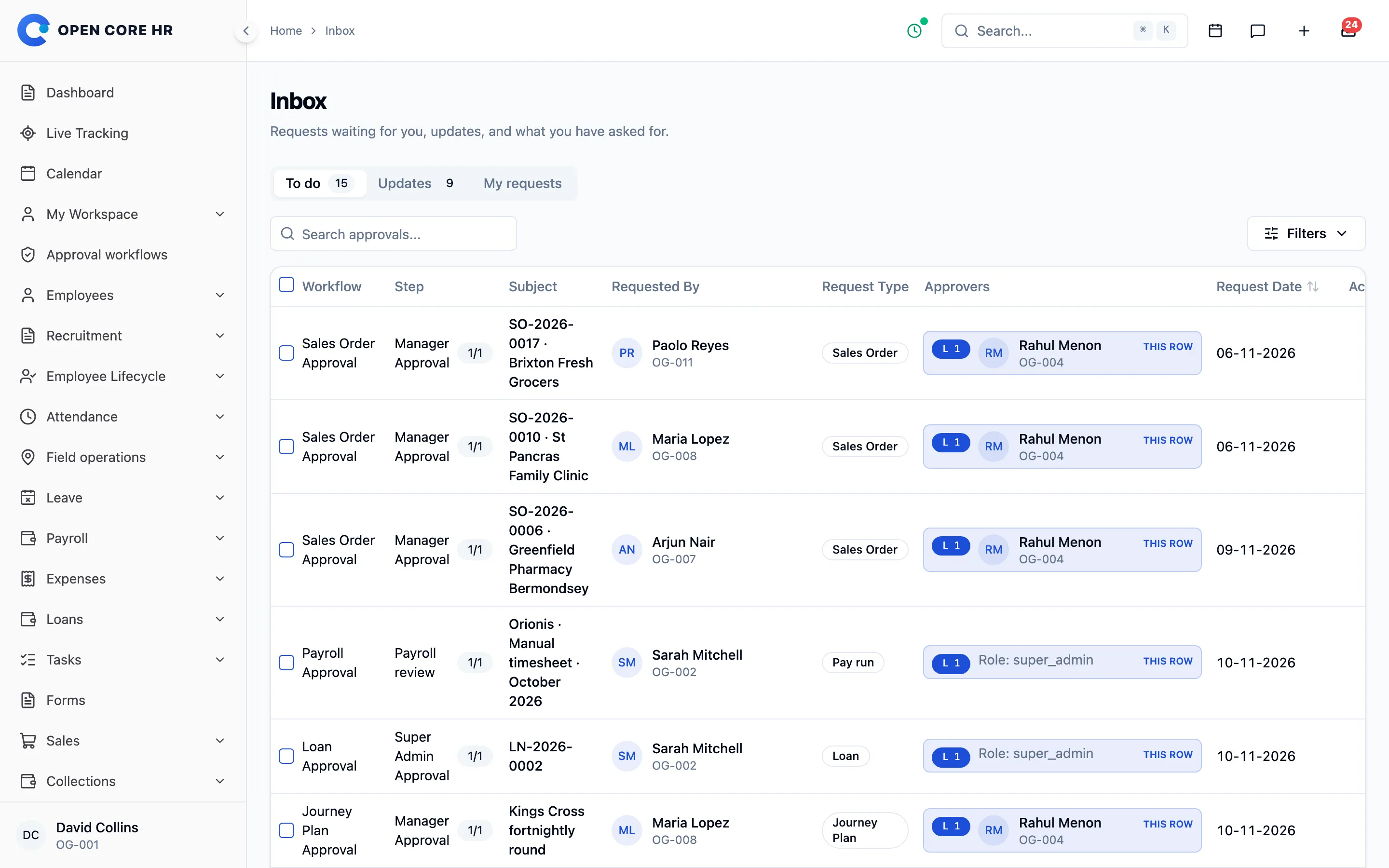
Leave, expense claims, journey plans and module requests arrive in one place for the right approver.
Included in Core
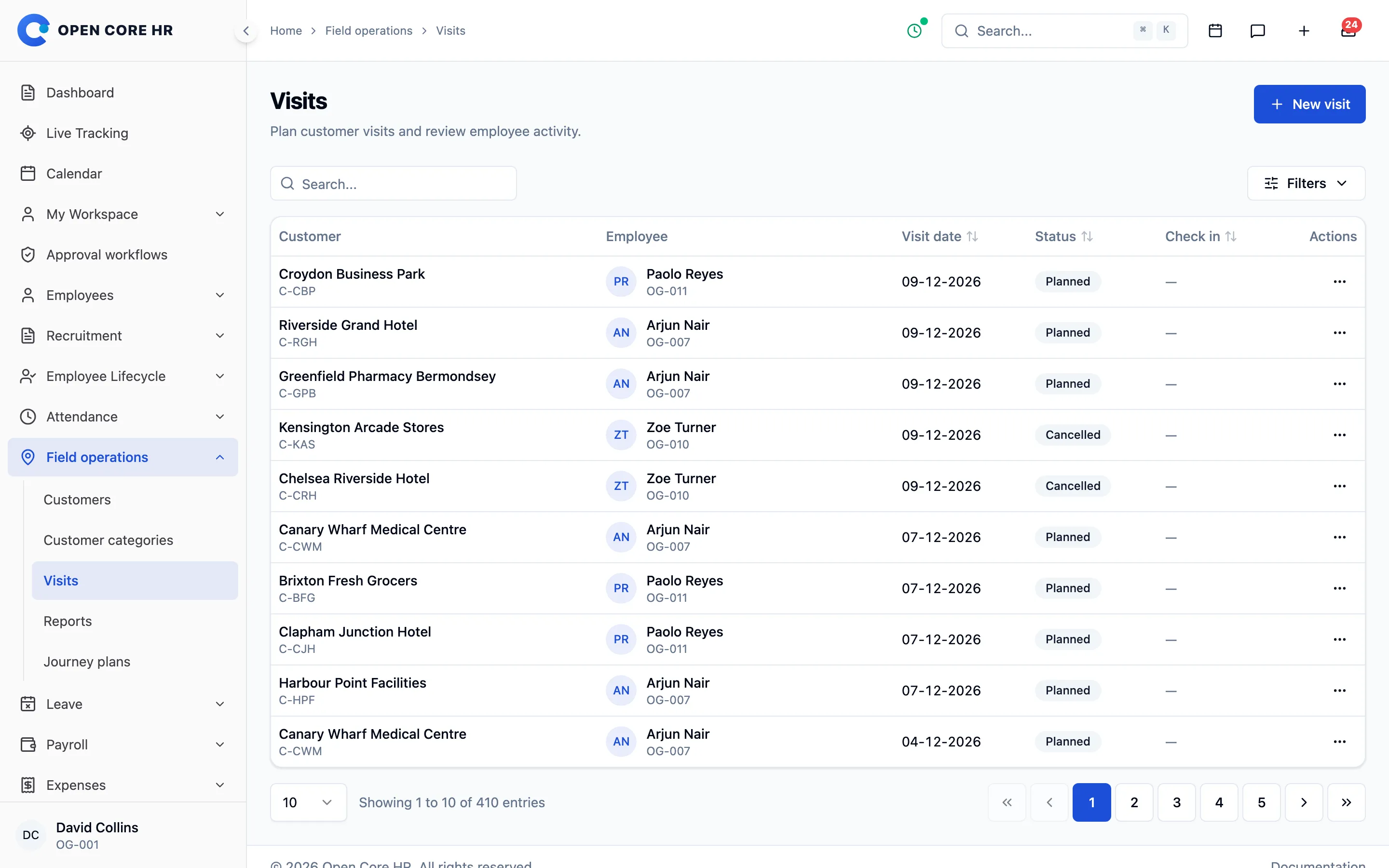
Plan customer visits, record outcomes with photos and follow the team on a live map, all in Core.
How Open Core HR works
From the first employee record to the monthly report, each person sees the information and actions their role allows.
HR team
Add employees, departments, locations, shifts, leave types and attendance policies.
Employee
Check in, request leave, submit expenses and record field visits from web or mobile.
Manager
Approve, reject or reassign leave, claims and plans, with every decision recorded.
Leadership
Follow attendance, leave, expenses and field activity on the dashboard and in reports.
Core is a complete foundation, not a demo. Manage people, time, money and field work from one place, then add specialist modules when you need them.
Employee records, organisation, dashboards and self-service
Shifts, check-in rules, geofence, selfie and review
Leave types, balances, team calendar and comp-offs
Plans, visits, live tracking, orders and collections
Writing help, Ask HR, HR data questions and receipt scanning on your own AI provider
Expense claims, pay runs, payslips and employee loans
Hiring, onboarding, documents, policies, warnings and assets
Inbox, calendar, chat, calls, feed and Outlook
One Android and iOS app for HR and field staff, on phones and tablets
Roles, settings, languages, backups, imports and webhooks
Workspaces, plans, signup, billing and subscriptions
Field operations, built into Core
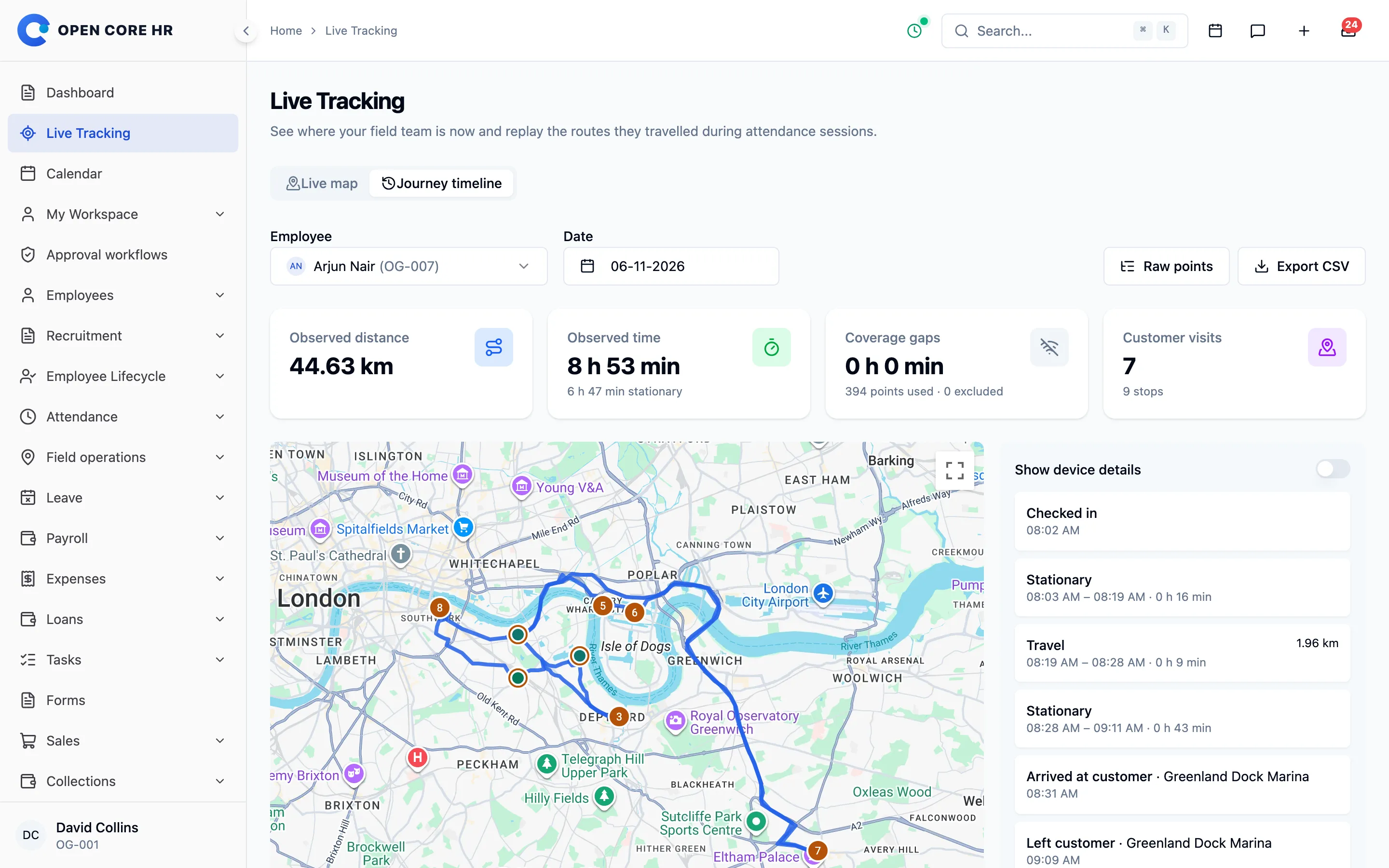
Sales reps, technicians and drivers use the same app as everyone else. Plan their day, see where they are, and get proof of every visit, with the same people, roles and approvals as HR.
A shared customer directory with categories, locations and assigned employees, so everyone knows who covers which account.
Planned and unplanned visits with check-in, outcomes, notes and photos captured on the phone at the customer's location.
Organize each rep's day into a route of visits, send it for approval and compare what was planned with what happened.
A live team map during work sessions, location history and route review, with background tracking and offline recovery on Android and iOS.

Assign tasks, take sales orders, record payments, run surveys and set targets from the same visit.
From the dashboard to the detail
Start with the dashboard, then open the report that answers your question. Every report follows the viewer’s permissions and can be exported.
Included in Core
Present, late and absent employees by day and period, with session details and corrections for each record.
Included in Core
Requests, balances and who is away, by leave type, department and period, with the team calendar alongside.
Included in Core
Claims by employee and category, with their approval and reimbursement status.
Included in Core
Planned and completed visits, routes and work sessions for employees working away from the office.
With Payroll
Pay runs, payslips and salary components, using attendance from Core.
Reports show the records each person is allowed to see. Payroll figures are operational records for your pay runs, not accounting statements.
AI inside the product
Draft HR texts in seconds, let employees ask HR at any hour, ask your HR data for a figure and fill expense claims from a receipt photo on the road. Connect Claude, Gemini, OpenAI or a model on your own servers. Nothing switches on until you do.
Ask HR
Can I take Friday 20 November off for my sister's wedding?
Yes. You have 9 days of annual leave left, and annual leave needs 3 days' notice, so Friday is fine. I have prepared the request for you.
Leave policy · Annual leaveLeave request ready to send
Answered from your policies. Nothing is sent until you choose.
For every employee
Employees check in, request leave, submit expenses and follow approvals from one app. Field staff get their visits and routes. With the communication add-ons, chat, calls and the company feed sit in the same app. On a tablet it uses the wider screen, with lists and the open record side by side.


See everything in the mobile app
Mobile features follow your enabled modules, permissions and attendance policies. Location features depend on device permissions and operating-system limits. You build and publish the app under your own name, or ask us to do it for you.
Built for global teams
Use the web workspace and mobile app in 25+ languages, from English, Arabic and Hindi to Spanish, Indonesian and Chinese, with full right-to-left layouts for Arabic, Urdu and Persian.
Employees pick their own language; the company sets the default.
Arabic, Urdu and Persian use mirrored layouts on web and mobile, not just translated labels.
Translation files are part of the source code, so your developers can add the languages your market needs.
Names, notes and other content your team enters stay exactly as written.
Extend your Core
Payroll, recruitment and onboarding, performance reviews, documents, chat and calls, field sales, Microsoft 365, and the tools to run Open Core HR as your own SaaS. Each add-on is a separate one-time license that attaches to Core.
Add-ons attach to your Core license. Some need another add-on, for example Calls needs Chat and the Outlook modules need the Microsoft 365 Connector. The cart adds required items for you.
Made to be yours
Run Open Core HR on infrastructure you control, with the source code for your developers. Start with Core, then choose the add-ons and installation help that fit.
Run the web workspace on your own server and connect the Android and iOS app. You control the hosting, the data and who has access.
Adapt your licensed installation with the full source, built on Laravel and React. Core works on its own; add-ons are separate modules.
Install it yourself or choose an installation package. Every license includes 12 months of updates and 6 months of support, extendable to 12 months at purchase.
Companies that want to own their HR software, including those with employees in the field. HR and managers work from the web; every employee uses the mobile app. It also suits businesses that want to host it as their own HR SaaS.
On your own server or cloud, with source code included. You can install it yourself or choose one of our installation packages. It is not hosted by us.
No. Core includes employees, attendance, leave, expenses, approvals, calendar, reports and field operations. Add only the modules you need, such as Payroll or Chat, each with its own one-time license.
Yes, with the SaaS add-on. It lets you host one installation for many customer companies, with plans, trials and recurring billing under your own brand.
Yes, when you want it. A free AI writing assistant, an HR assistant that answers from your policies, questions about your HR data and receipt scanning for expenses run on the AI provider you choose: Claude, Gemini, OpenAI or a model on your own servers. AI stays off until an administrator switches it on, and you pay your provider directly.
Your installed software continues to run and eligible earlier releases remain available. Renew when you want another year of updates; there is no automatic renewal.
CZ App Studio
Tell us how your company works. We’ll help you find the right Core, add-ons and installation approach.