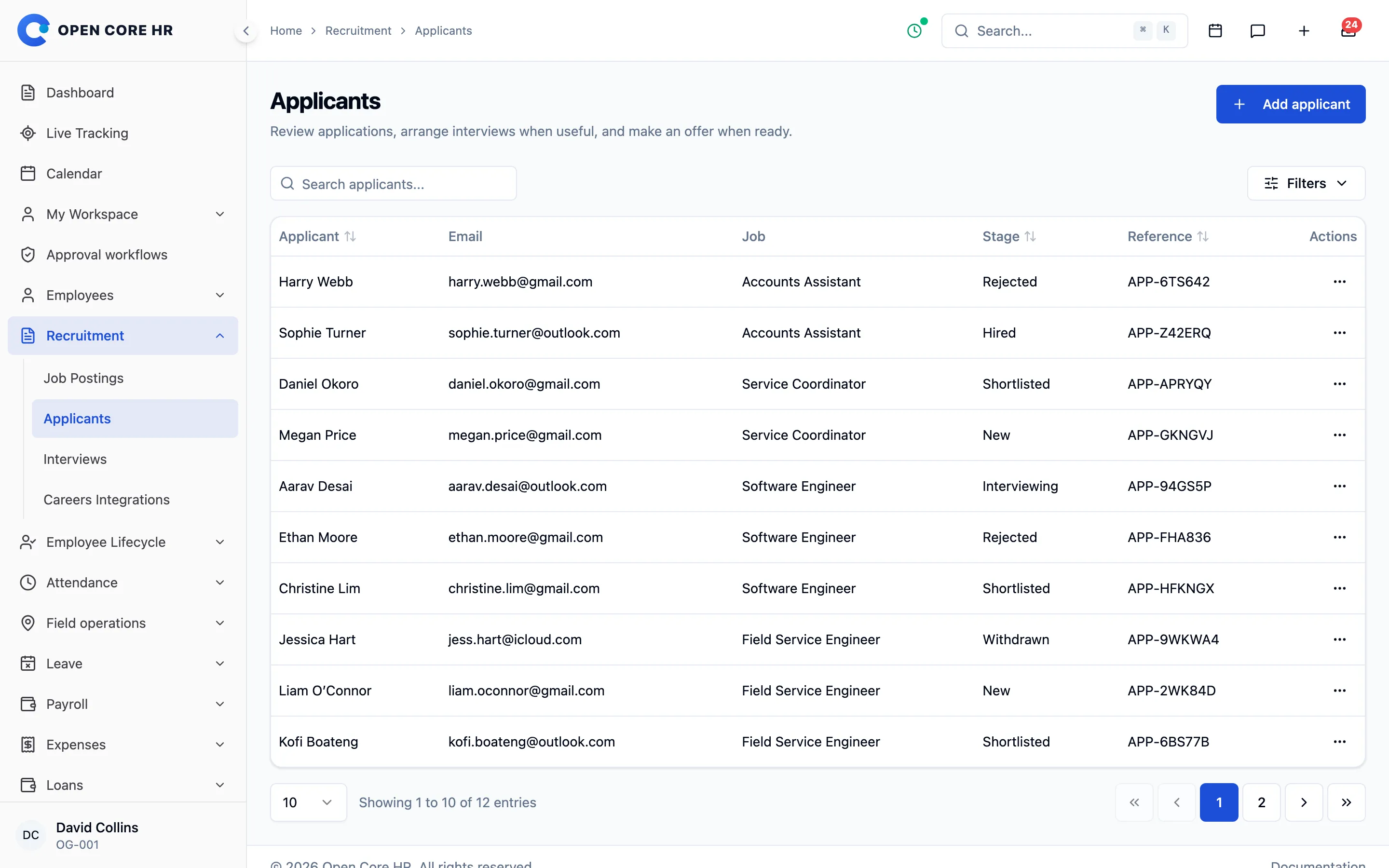
Manage hiring, joining, role changes and exits as connected records. Publish jobs, track applicants, send offers, complete onboarding, confirm probation and close separations with handover tasks and settlements.
Job postings, applicants with CVs, and optional interviews with recorded outcomes.
Offers that candidates accept or decline through a secure link, followed by an account invitation.
Onboarding records that check required documents, with optional probation reviews and confirmation.
Promotions, transfers and pay changes that keep the previous and proposed terms and apply on their effective date.
Separations with assigned exit tasks, optional final settlements and employee resignation requests.
A careers API with scoped tokens, so your own website can list published jobs and accept applications.
Where and how it works
HR manages the lifecycle in the web workspace, and employees follow their own changes, probation, resignation and settlement in self-service; issued letters are also available in the mobile app. It records terms and amounts but does not calculate payroll, tax or end-of-service entitlements.
English · العربية (right-to-left) · Español · Français · हिन्दी · Português (Brasil) · Bahasa Indonesia · 简体中文 · বাংলা · اردو (right-to-left) · Deutsch · Русский · 日本語 · 한국어 · Türkçe · Tiếng Việt · ไทย · Filipino · Kiswahili · தமிழ் · తెలుగు · मराठी · فارسی (right-to-left) · Bahasa Melayu · Italiano
Every update is a versioned, checksummed package. Download eligible versions from your account. View all releases
The first public release is being prepared. Purchases include every update released in the next 12 months.
Support
Standard and premium support
Standard support comes with your licence: we help you use the product and fix its bugs. Premium support is paid by the hour: our team does the work for you.
Standard support
Included with your licence
We answer your questions and fix problems in the product.
Questions about how a feature works
Help understanding the installation and update guides
Fixing bugs in the product
Advice on security issues and the release that fixes them
How you get it
6 months come with every licence. Extend to 12 months when you buy, or renew later from your account.
Renew for $49.00 per 6 months
Premium support
Paid by the hour
Our team works on your installation for you.
Installing or updating the software on your server
Changing how the product works for your business
Server, email, domain and SSL setup
Importing or moving your data
Live calls, screen sharing and training
How you get it
Buy a support-hour package. We tell you how long the work will take before we start, and only the time used comes off your balance. Hours never expire.
From $34.95 per hour
Which one do I need?
“A report shows the wrong total.”
Standard support
“Where do I set up shifts?”
Standard support
“Please update my server to the latest version.”
Premium support
“Add a new field to the leave form.”
Premium support
“Import our employees from a spreadsheet.”
Premium support
“Train our team on a call.”
Premium support
Support questions
Does my software stop working when support ends?+
No. Your licence is permanent and the software keeps working. You only lose the ability to open standard support tickets until you renew.
What can I do when my 6 months of support end?+
Renew standard support from your account for another 6 months, at any time. Or buy support hours when you only need help with one task. Nothing renews automatically.
I still have standard support. Do I need premium support too?+
Only when you want our team to do work that standard support does not cover, such as installing, customising, importing data or training. Many customers never need it.
Will I be charged for premium support without agreeing first?+
No. We send an estimate of the time needed, and nothing is taken from your support hours until you approve it. Every use is listed in your account.
Do support hours expire?+
No. Unused hours stay on your account until you use them.
Is support the same as updates?+
No. Updates give you new releases for 12 months. Support gives you help from our team. They are renewed separately, and neither one stops your software.
Can your team install the product for me?+
Yes. Choose a fixed-price installation plan, or use support hours. Setting it up yourself with an AI assistant and our guides is free.
How do I ask for help?+
Sign in, open Support in your account and create a ticket. You choose standard or premium there, and we tell you if a request needs the other one.
Publish a job or add an applicant, interview if needed and send an offer.
02
Complete onboarding and, where it applies, confirm probation.
03
Record employment changes and close exits with tasks and settlements.
Questions about this add-on
Do I have to use recruitment for every hire?+
No. Every step is optional: you can add an employee directly, start onboarding without an offer, and skip interviews or probation. Jobs reach candidates through your own careers website via the careers API; a ready-made careers site is not included.
What happens when my updates expire?+
Your installed software continues to run and eligible earlier releases remain available. Renew when you want another year of updates; there is no automatic renewal.
Cookies and analytics. We use Google Analytics cookies to understand how visitors use the site and which campaigns work. Essential cookies for sign-in and your cart are always on. Cookie policy