
جميع الأدلةالوحدات الإضافية
Webhooks
Send signed event notifications from Open Core HR to your own systems.
Use the optional Webhooks module to notify another system when an employee account changes. A super admin enables it in Modules and opens Webhooks to configure destinations. It works independently of careers integration and does not require an API client or token.
Add a destination
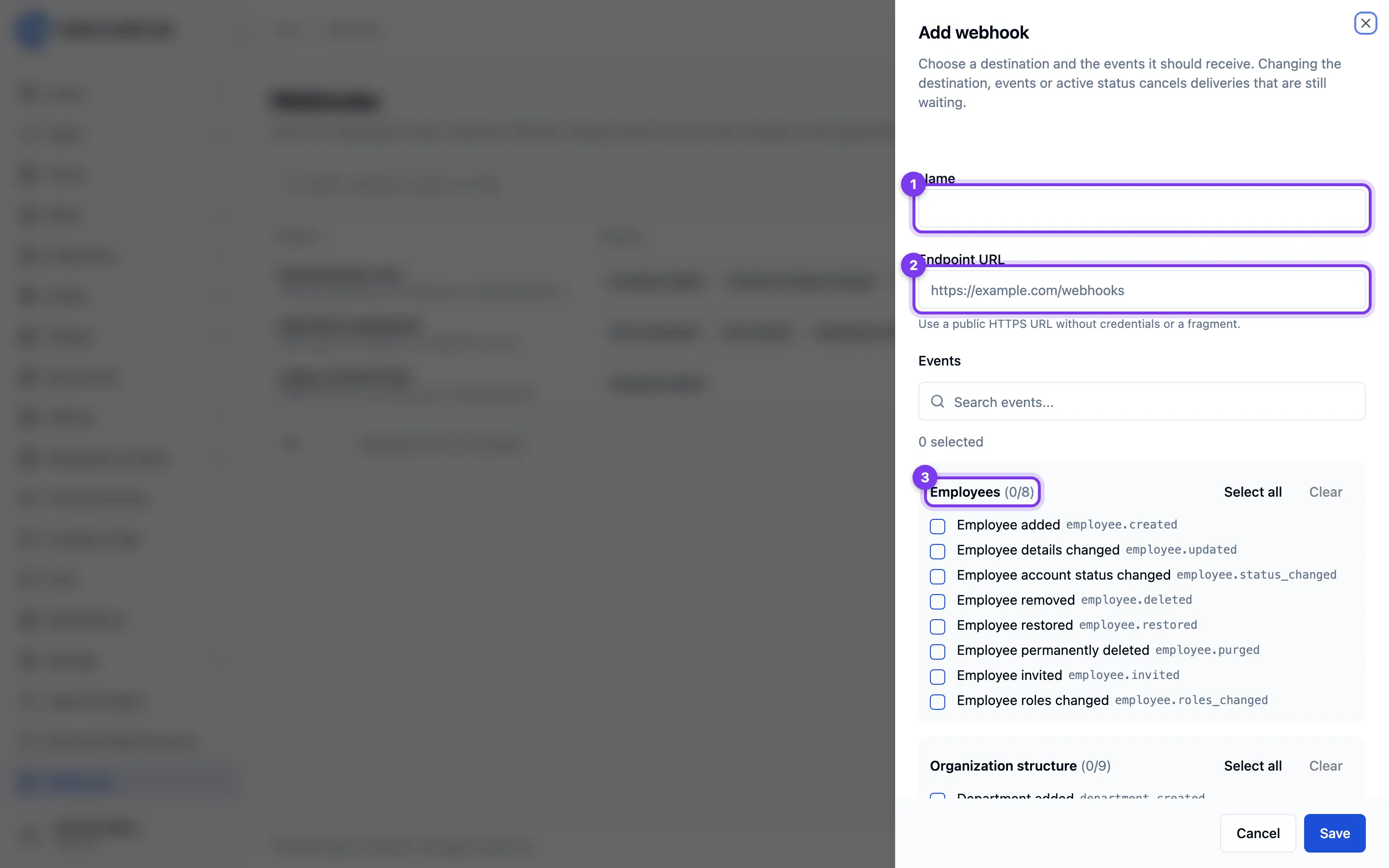
- Ask the receiving system's administrator for its public HTTPS endpoint.
- Add an endpoint with a recognizable name and that URL. URLs containing login credentials or fragments, private network addresses and redirect destinations are not supported.
- Select the employee events the receiver needs, then save the endpoint.
- Copy the signing secret immediately and configure it securely on the receiving server. It is shown once; it is not an API access token.
- Send a test delivery and check its delivery history before relying on it.
Supported events are employee creation, profile updates, account-status changes,
deletion, restoration and permanent deletion. Their event names are
user.created, user.updated, user.status_changed, user.deleted,
user.restored and user.force_deleted. Payloads contain the event's supported
work-profile fields, not passwords, compensation or private employee details.
Verify and process deliveries
The receiving system must verify the signature before acting on a message. Give its developer the following contract:
X-Webhook-Eventidentifies the event.X-Webhook-Deliveryis the stable delivery ID; use it to avoid processing a retried delivery more than once.X-Webhook-Timestampis a Unix timestamp. Reject timestamps outside the receiver's accepted clock-skew window.X-Webhook-Signatureissha256=followed by the hexadecimal HMAC-SHA256 oftimestamp + "." + exact request body, using the endpoint's signing secret. Compare signatures in constant time; do not re-encode the JSON before checking.
Return a successful HTTP response after accepting the event. Deliveries may arrive more than once or out of order; design the receiver accordingly.
Investigate failures
Open the endpoint's delivery history to check status and attempts. Fix the receiving server's availability, HTTPS certificate or signature configuration, then send another test. The sender does not follow HTTP redirects.
By default, a retryable failed delivery receives up to three retries, after 1 minute, 5 minutes and 1 hour, for a maximum of four attempts. Blocked destinations and oversized payloads fail without retries. Queue workers and the scheduler must be running; see services setup. Delivery history contains sanitized results, not the receiver's response body.
Pause, rotate or remove
Deactivate an endpoint to stop sending to it. Pending work is cancelled when the endpoint or module is disabled; re-enabling does not replay cancelled events. Changing the destination URL or event subscriptions also cancels pending work. Delete an endpoint when it is no longer needed.
If a signing secret is exposed or lost, rotate it and copy the replacement when shown. Pending deliveries are preserved and their next attempt uses the new secret. Update the receiving system promptly so it can verify them.
Completed, failed and cancelled delivery logs are removed automatically after 30 days by default. Pending deliveries are not removed by this retention task.
Delivery settings
A super administrator can change delivery behaviour in Settings → Webhooks: the request timeout (1–120 seconds), how many times a failed delivery is retried (0–10), and how many days finished delivery logs are kept (1–365).