
All guidesInstallation
Installing and managing add-ons
Buy, install, update, switch on and configure add-ons from **Settings → Modules**.
Add-ons are optional modules such as Payroll, Tasks or Geofence Attendance. They are installed into the Modules/ folder of your installation and are never overwritten by Core updates. The page is available to the super administrator of the main organization. Activate the installation first (see Licences and activation).
What each card shows
| Card shows | Meaning | What you can do |
|---|---|---|
| In the store + Buy now | Not owned and not installed | Open its page on czappstudio.com and buy it |
| Free + Claim free | A free add-on you have not claimed yet | Open its page on czappstudio.com and complete the order; there is nothing to pay |
| Owned + Install 1.2.0 | Owned, not yet on this server | Install it |
| Enabled / Disabled | Installed and licensed | Switch it on or off |
| Update to 1.3.0 | A newer release you are entitled to | Update it |
| Not licensed / Off until licensed | Files are on the server but no licence is attached | Buy it, or attach your licence in your account |
| Configure | The add-on has settings | Open its settings without leaving the page |
Use Filters → Available to install to see only add-ons that are not on the server yet.
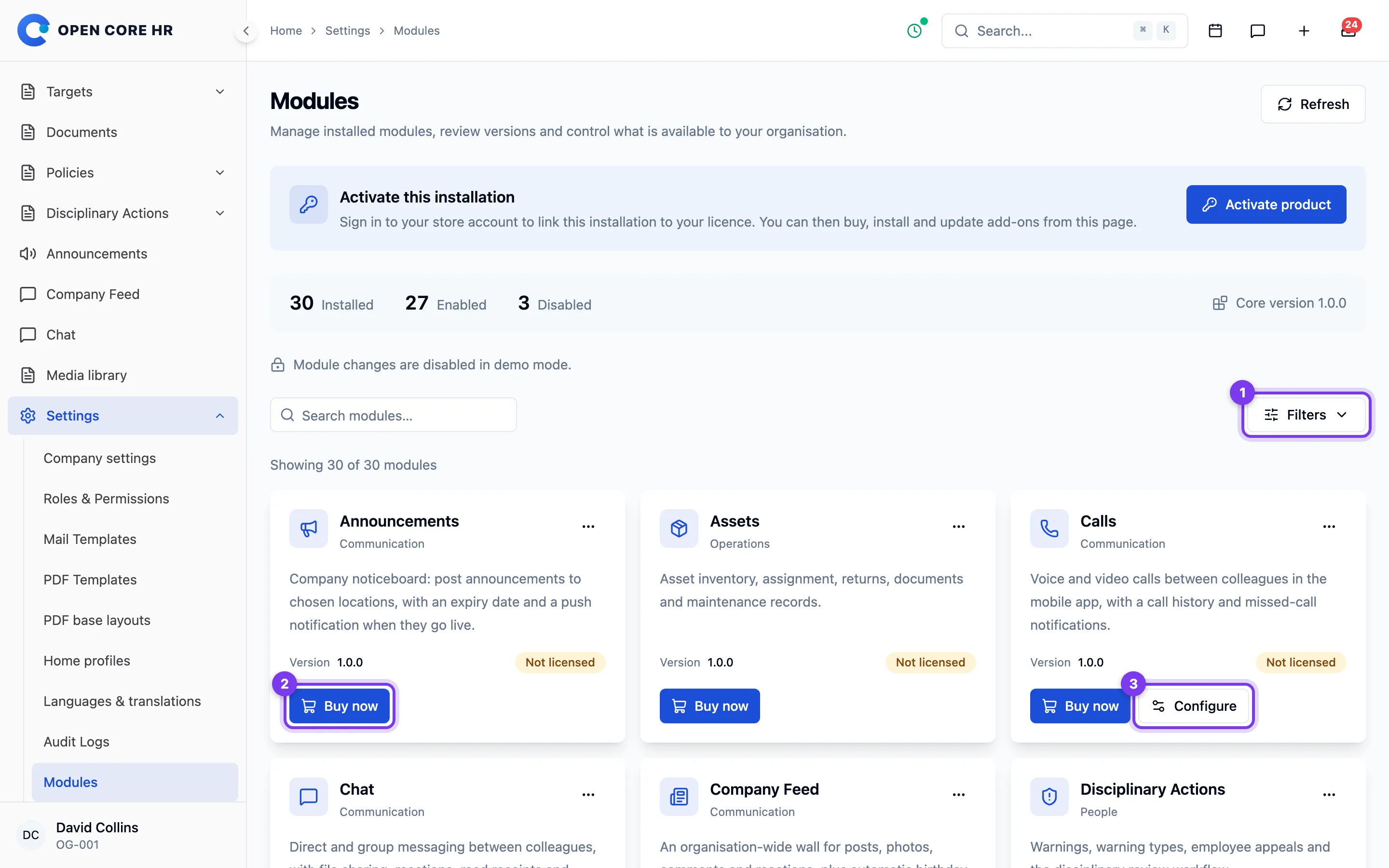
Buy an add-on
Choose Buy now. The add-on's page opens on czappstudio.com in a new tab; complete the purchase there. A purchase started from Buy now is attached to this installation's licence automatically. Back in the product, choose Check for updates; the card shows Install.
Free add-ons show Claim free instead. The steps are the same, except that the order completes without payment; you need to be signed in to your czappstudio.com account. A free add-on receives updates for as long as the Core licence it is attached to.
Install or update
Choose Install (or Update to …), then Install. Keep the window open while it:
- downloads the release, checks it against CZ App Studio's signature, and places the files in
Modules/<Name>; - switches the add-on on, which runs its database changes and adds its permissions.
When it finishes, choose Configure if the add-on has settings. Some add-ons need another first: Calls needs Chat, and the Microsoft 365 add-ons need the Microsoft 365 Connector. Install and enable those first.
If an install fails
The dialog shows what to fix on the server, then Try again. The previous copy of an add-on is kept until the new one is in place.
| Message | Fix |
|---|---|
| PHP (running as www-data) cannot write to …/Modules | Give the PHP user write access, for example sudo chown -R www-data /path/to/backend/Modules, then retry. |
| Not enough free disk space | Free space on the server's storage disk. |
| The PHP zip extension is missing | Install and enable it (for example php-zip) and restart PHP. |
| The download does not match the store's signature | Nothing was installed. Try again; if it repeats, contact support. |
| The database refused a change | The add-on stays off. Check the database user's permissions (CREATE, ALTER, INDEX) and retry. |
| This add-on needs a licence | Buy it, or attach it to this installation's licence in your account. |
Switch off or remove
Disable module hides the add-on and its menus; its data is kept and comes back when you switch it on again. An add-on cannot be switched off while another add-on or an attendance policy uses it.
Free modules and your own modules
Modules you build yourself have no store code and are never licensed or updated by CZ App Studio. See Building your own module.